Datafiles
At present, SUMO's heatmap viewer supports the data formats:
- Tab delimitd text files for loading of expression
matrices
- SUMO heatmap.
A XML-like file containing the expressionmatrix,
Feature- (gene-)/ Coindition- (sample-) tree - if clustering was performed -
Condition-/Feature-groups, ...)
Display options
...
To load a data file goto the File menu:
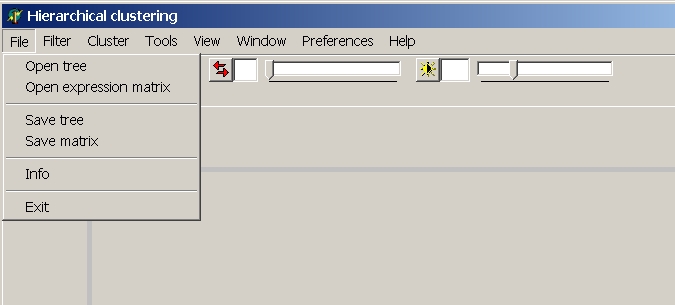
Open expression matrix
From the file selection dialog select the data file type from Filter frop down list:
Tab-delimited text
SUMO expects a tab-delimited text file.
Such files are easily generated from microarray databases or exported from spreadsheet programs (e.g.
MS EXCEL | File save as | Tab delilited tex).
Select Main menu | Open expression matrix to load a tab-delimited text file containing
expression values for
- multiple hybridisations (one hybridisation per data column)
- multiple genes (one gene per data row)
- gene annotations in first few data columns
- hybridisation annotations in first few data rows.
A file preview window (showing first hundreds lines of the selected file)
opens up:>br>
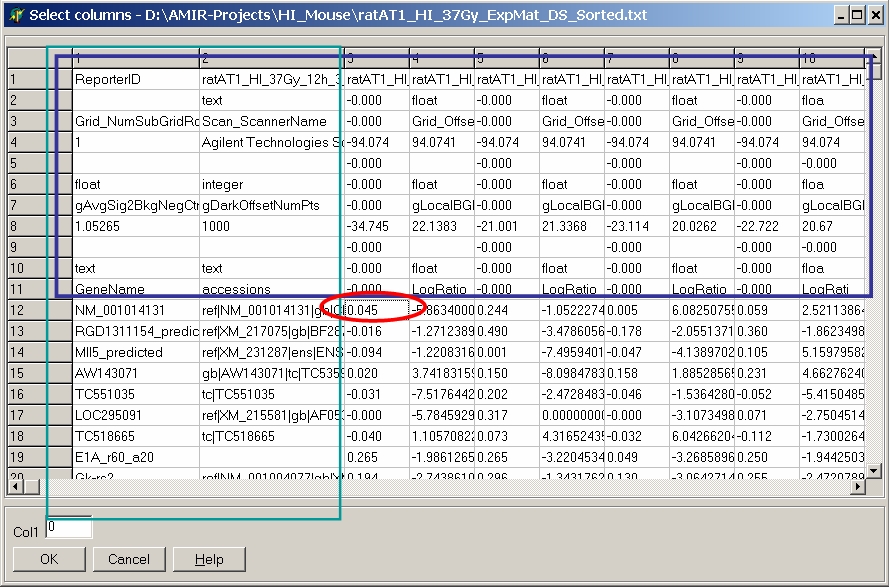
Double click the most left / upper data cell
containing expression data. All data right / below this cell are used for
clustering.
All lines above are used for hybridisation
annotations, all columns left are used for gene
annotations.
Although originally designed for gene expression data you may use any kind of 2-dimensional
numerical data in tab delimited text format:
Gene expression, Methylation, CGH, Protein/Antibody arrays, sales data, ...
Even a black-white image stored pixel-wise as tab delimited text may be loaded.
SUMO heatmap
Select a heatmap file previously saved with SUMO as SUMO heatmap.
(Select respective filter from the File type drop down list in File Save as dialog.
See an example of a SUMO-heatmap.
The size of the expression matrix is mainly limited by the computer's free RAM.
Drag and drop files
Most easily, drag a suited file from Windows Explorer and drop it into SUMO's Heatmap viewer.
It will try to recognize the format and handle the file accordingly.