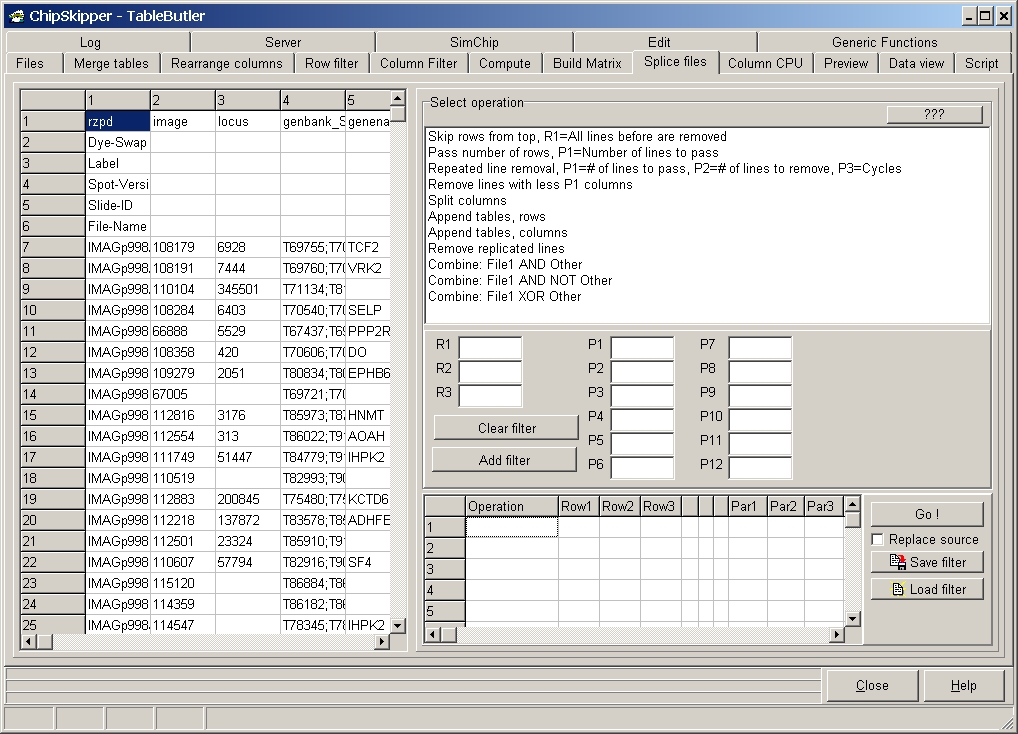
Here you find functions to combine or cut data files into pieces.
The left data grid shows the first few hundred lines of the FIRST selected data files.
Edit fields R1..R3 and P1..P12 are used to supply operation specific parameters.
By default TableButler dreates new files with name"sourcefilename.txt_slc".
To overwrite source files check the Replace source check-box.
Split columns:
Split a data file into multiple data files. containing a fixed first column (e.g.
Feature ID, then a ficed number of columns.
R1 = Number of Fixed column.
R2 = Number of First data column
P1 Number of successive columns.
Assume the file:
| ID1 | ID2 | ID3 | D1 | D2 | D3 | D4 | D5 | D5 | D7 | D8 | D9 | D10 |
Use parameter:
R1=2 (=fixed column)
R2=4 (=first data column)
P1=2 (=number of succesive columns)
Will create:
|
|
|
|
|
Append tables, Rows:
As the name says, multiple tables may be appended "one on top of the other:
|
|
+ |
|
= |
|
P1 = Number of files to append into 1 file.
Assume 8 files are selected: A,B,C,D,E,F,G,H
P1=2: A+B=> AB, C+D=>CD, EF=>EF, F+H=>FH
P1=4: A+B+C+D=>ABCD, E+F+G+H=>EFGH
P1=8: A+B+C+D+E+F+G+H=>ABCDEFGH
P1=3: A+B+C=>ABC, D+E+F=>DEF, G+H=>G+H
It would be recommended to ONLY splice files which have same number of COLUMNS (as shown above).
Append tables, Columns:
As the name says, multiple tables may be appended "one on top of the other:
|
|
+ |
|
= |
|
Parameters as above.
It would be recommended to ONLY splice files which have same number of ROWS (as shown above).
Remove replicated lines:
This functions removes lines from the source files where cells in the defined column have the same content.
R1 = Number of column where replicated cells are searched.
Assume the file:
| Data1_1 | Data2_1 | Value1 |
| Data1_1 | Data2_2 | Value2 |
| Data1_2 | Data2_1 | Value3 |
| Data1_2 | Data2_2 | Value4 |
Filter on column 1 (R1=1) will generate the file:
| Data1_1 | Data2_1 | Value1 |
| Data1_2 | Data2_1 | Value3 |
Filter on column 2 (R1=2) will generate the file:
| Data1_1 | Data2_1 | Value1 |
| Data1_1 | Data2_2 | Value2 |
Last edited 25.01.2006,